Database Settings
Database settings control the global configuration of your entire database — not just a single view. While view settings only affect how one particular lens displays your data, database settings change the underlying structure and behavior that every view shares.
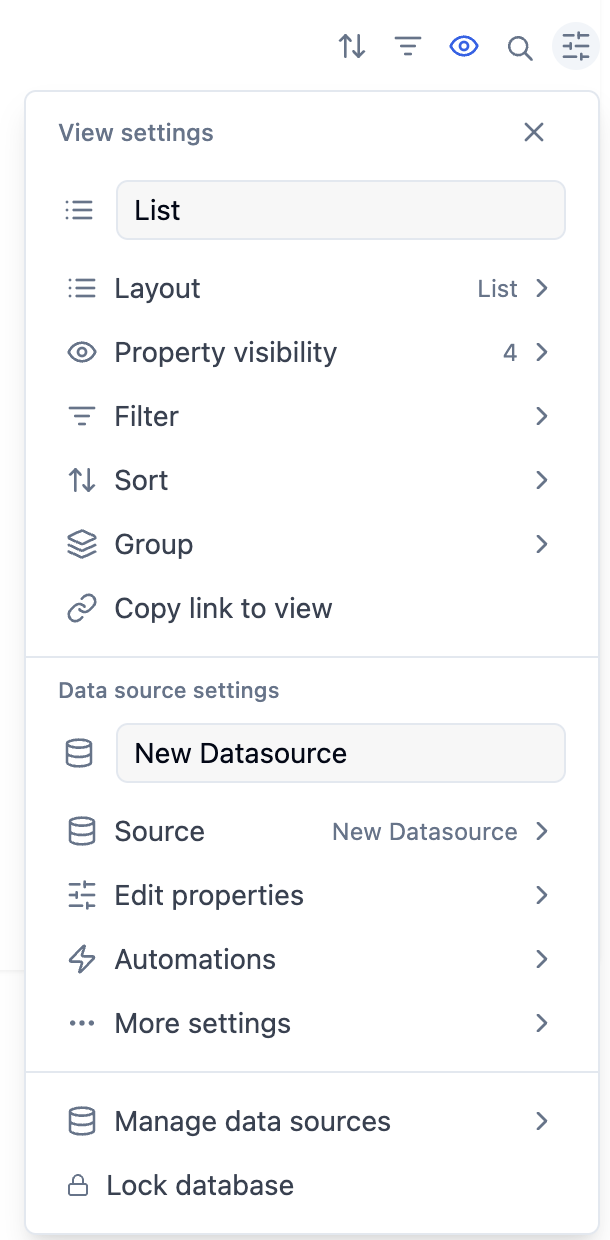
To access: click the settings icon (sliding scales) at the top right of any database → look for items listed under Database settings.
You need Can edit access or higher to modify database settings. Users with "Can edit content" permission can enter data but cannot change the structure.
Lock Database
When you lock a database, collaborators can still enter and edit data, but they cannot:
- Add, remove, or rename properties
- Create or delete views
- Change view settings
This is useful once you've finalized a database schema and want to protect it from accidental structural changes by teammates who only need data-entry access.
To lock: settings menu → toggle Lock database on To unlock: same toggle — only users with Can edit access can unlock
Edit Properties
This opens the full property management panel where you can:
- Search for a specific property by name
- Create new properties
- Edit existing properties — rename, change type, adjust type-specific settings
- Duplicate any property
- Delete properties you no longer need
- Reorder properties via the drag handles
See the Database Properties article for full detail on every property type and its configuration options.
Dependencies
Task dependencies let you link items together in a sequential relationship — "Task B cannot start until Task A is done." When dependency date shifting is enabled, adjusting one item's dates can automatically cascade forward to all dependent items.
See the Sub-items & dependencies article for full configuration details.
Sprints
Sprints when enabled, this setting creates sprint infrastructure — a sprint board, a sprints database, and views for current sprint, sprint planning, and backlog management.
Connect to Slack
Connect external apps and services directly to this database like slack . Connected apps can read from and write to your database through integrations, enabling workflows that extend beyond Closot.
Up next: Database templates — Define reusable page structures that pre-fill content and properties for new items.